3- 🌟 Pykid Functions 🌟
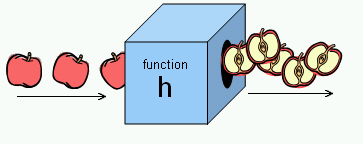
Think of a function as a super-cool gadget that can do a special job for you, just like a robot helper!
Let's create a gadget called "my_function":
def my_function(): # Inside the gadget, we write the instructions for its job:
     print("👋 Hello from Pykid!")
Now, we can use the gadget by calling its name, like pressing a button:
my_function() # This makes the gadget do its job, and we see the message!
# Output: 👋 Hello from Pykid!
We can make our gadgets even more awesome by giving them special tools to work with!
For example, let's give a gadget a name to use in a greeting:
def greet_friend(name): # Now the gadget knows to use the name we give it:
     print(f" Hello, {name}! How are you today?")
Let's try it out!
greet_friend("Aisha")
# Output: Hello, Aisha! How are you today?
greet_friend("Anas")
# Output: Hello, Anas! How are you today?
Cool, right? The gadget can do different things depending on the tools we give it! It's like having a whole toolbox of gadgets!
Remember, functions are like our trusty robot helpers in coding, making our programs easier and more fun to build!
Creating a Function to Introduce Animals:
Imagine a special machine called "animal_sounds" that knows about different animals and their sounds.
This machine takes the name of an animal as its input.
It has a set of instructions for each animal it knows:
If you tell it "cat", it prints "🐱 A cat says: Meow!"
If you tell it "dog", it prints "🐶 A dog says: Woof!"
And so on for cows, ducks, and more!
If you give it an animal it doesn't know, it politely says "Sorry, I don't know that animal!"
def animal_sounds(animal):
    if animal == 'cat':
        print("🐱 A cat says: Meow!")
    elif animal == 'dog':
        print("🐶 A dog says: Woof!")
    elif animal == 'cow':
        print("🐮 A cow says: Moo!")
    elif animal == 'duck':
        print("🦆 A duck says: Quack!")
    else:
        print("Sorry, I don't know that animal!")

# Introducing different animals and their sounds
animal_sounds('cat')
# Output: 🐱 A cat says: Meow!

animal_sounds('dog')
# Output: 🐶 A dog says: Woof!

animal_sounds('cow')
# Output: 🐮 A cow says: Moo!

animal_sounds('duck')
# Output: 🦆 A duck says: Quack!

animal_sounds('elephant')
# Output: Sorry, I don't know that animal!
Playing Animal Sounds:
- We can make this machine even cooler by giving it the ability to play real animal sounds!
- We import a special tool called "playsound" that can play audio files.
- Now, instead of just printing the sound, the machine can play it out loud!
- We give it the location of each sound file, like a map that helps the machine find the right sound.
Calling the Function:
- To use the machine, we call it by its name, "animal_sounds", and give it the name of the animal we want to hear.
- For example,
animal_sounds('cat')plays the cat's meow. - We can call it many times to hear different animals!
Note: install the tool first with pip install playsound.
from playsound import playsound

# Function to play animal sounds
def animal_sounds(animal):
    if animal == 'cat':
        playsound('https://www.myinstants.com/media/sounds/meow_3.mp3')
    elif animal == 'dog':
        playsound('https://www.myinstants.com/media/sounds/dog-barking-sound-effect.mp3')
    elif animal == 'cow':
        playsound('https://www.myinstants.com/media/sounds/cow1.mp3')
    elif animal == 'duck':
        playsound('https://www.myinstants.com/media/sounds/duck.mp3')
    else:
        print("Sorry, I don't know that animal's sound!")

# Calling the function to play animal sounds
animal_sounds('cat')
animal_sounds('dog')
animal_sounds('duck')
animal_sounds('cow')
Handling Unknown Animals:
animal_sounds('elephant')
# Output: Sorry, I don't know that animal's sound!